ColorZilla v2 is here
 If you’re not familiar with ColorZilla, it’s a Firefox extension I wrote a while back to help me with my web design and development tasks. Over the years, it became quite popular with web developers and designers.
Anyway, over the course of this past year I added a few new features to ColorZilla (mainly because I needed them for my own work  ), but because 2007 has been a very busy year for me, I just couldn’t find the time to properly test and release the new stuff to the public. Now, with Firefox 3 just around the corner, I finally took a bit of time to put everything together and release ColorZilla v2.
So, here’s what’s new in ColorZilla v2:
Webpage DOM Color Analyzer
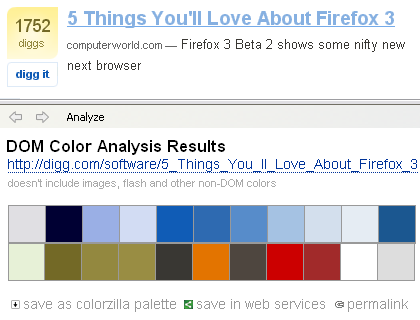
Basically, this feature started with several simple questions – what colors are in use on any given Web page? What HTML elements use them and what CSS rules define those colors? So, Webpage DOM Color Analyzer analyzes a Web page and produces a palette of all the colors on that page. By hovering on any color, you can see what elements use that color, and by clicking on a color you can see a detailed listing of all the CSS rules that apply that color to DOM elements. You can even click on a CSS rule have ColorZilla open the corresponding style sheet file with the rule highlighted.
You can save the page colors as a ColorZilla palette, or open the palette in ColorZilla Online Viewer.
ColorZilla Online Palette Viewer
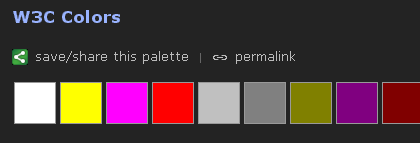
The online palette viewer is a simple webapp that can be used to view a color palette, bookmark it and share it using any number of bookmarking services such as del.icio.us, Google Bookmarks etc.
It works by providing a simple semantic URL that describes a set of colors:
http://colorzilla.com/colors/COLOR_1+COLOR_2...COLOR_N[/PALETTE_NAME]
Each color should be specified in a hex notation similarly to CSS, so for example red is FF0000 and yellow is FFFF00. The ‘palette name’ portion of the URL is optional.
Here’s an example of a palette URL:
http://colorzilla.com/colors/ff0000+00ff00+0000ff/Simple+RGB+Palette
Click here for an additional example.
When viewing palettes online, you get an online eyedropper (that works in all browsers!) that displays color information in many different formats for any color in the palette.
The online viewer can be opened from the ColorZilla Webpage Color Analyzer, or from the ColorZilla Palette Viewer dialog. The simple format of its URL also allows using it with any other application or Web service – all the application has to do is to generate a list of colors, append it to colozilla.com URL and launch that URL in a browser.
Additional features
- Firefox 3 has a new Full Page Zoom functionality that allows viewing pages at any zoom level and handles both text and images very nicely. With Firefox 3 ColorZilla will use this new functionality for its internal zoomer.
- Firebug support – until now, ColorZilla allowed you to quickly open the selected element in Dom Inspector. Now, if you have Firebug installed, it will also allow you to quickly open it in Firebug.
- Ubuntu support was added. Basically, because Ubuntu’s Firefox was compiled using a slightly different compiler, ColorZilla eyedropper didn’t work unless you installed an official Firefox build from Mozilla. This version solves this problem by providing two versions of the eyedropper module, one built with the newer compiler (gcc4) and one with the older one.
- ColorZilla is now compatible with Firefox 3
- 3 new languages were added – Indonesian, Korean, Norwegian. Thanks to the BabelZilla team!
ColorZilla v2 (v1.9) is still in beta, but should be stable enough for everyone to try. Check it out and let me know what you think


January 12th, 2008 at 8:25 pm
Wow… thanks so much for these awesome upgrades. I use Colorzilla every day for work and pleasure and didn’t think it could get any better. This is great stuff. Thanks again!
January 13th, 2008 at 2:37 pm
ColorZilla is my most used Firefox-app. As a web developer with over ten years experience, this little plug-in has made life so much better for me – and this new version simply blows it all out the water. Thank you!! I have often wanted to check out the colors on a page or find out which CSS code went with each rule (which I usually accomplished by figuring out the color with ColorZilla and doing a CTRL+F on the style sheet, if available). You’ve made an amazing little program 110% better and solved a helluva lot of little work-arounds & problems for folks all over. Did I say thank you? THANK YOU! Much love – namaste.
January 14th, 2008 at 7:20 am
Great work! Now the only thing to add is export current page palette to Photoshop format
Anyway, thank you a lot for this extension, it’s utterly useful.
January 14th, 2008 at 7:47 pm
I also use this extension everyday, an indispensable extension!!
January 14th, 2008 at 9:42 pm
Dope!
January 15th, 2008 at 9:43 am
Thanks!
It’ll be great if the information displayed on status bar can be displayed as a “tip” following the cursor (the eye dropper). Sometimes it’s a bit difficult to pick up a color on a small element (I must look at the left bottom corner of the display to make sure that the right color is selected).
January 15th, 2008 at 10:08 am
Fantastic utility; indispensable to web developers! Still finding new ways to use it!
January 15th, 2008 at 9:44 pm
That was a nice surprise when I started firefox: a new version of this plugin. I enjoy the palette functionality, thanks!
Reinout
January 24th, 2008 at 5:00 am
I can’t believe I lived my life without knowing about colorzillla. I’m glad that there are people like you in the world.
And for all those web developers:
GET COLORZILLA NOW.
You won’t regret it 😀
January 31st, 2008 at 2:10 am
I’ve tried ColorZilla v2 beta (1.9) with the Firefox 2.0.0.11 from Ubuntu 7.10 (not the Firefox downloaded from mozilla.com). The extension has installed, but any tentative of using the color picker returns an error dialog (installation error or eyedropper not supported in this platform). In addition, Firebug begun inoperant while this new ColorZilla was installed (restart to work after I uninstalled ColorZilla).
February 14th, 2008 at 12:56 pm
It still has a problem with screwing up the myfirefox and vista_aero themes.
Every time I use the extension with either of these themes loaded, the icons on the sides of the tabs get duplicated. i.e. If I use the color picker twice, I have three sets of each of the icons.
There are several others with the same problem, and I was hoping this latest update was a fix for that.
Heres the firefox discussion with links to screen shots:
https://addons.mozilla.org/en-US/firefox/discussions/comments.php?DiscussionID=2140
February 20th, 2008 at 5:15 pm
Hi,
Just installed on the lastest Ubuntu (Gutsy), and I still get the error dialogue that I got with the previous verson.
February 22nd, 2008 at 12:56 pm
I’m running Ubuntu 7.10, Firefox 2.0.0.12 with ColorZilla v1.9 installed – the Eyedropper tool produces the ‘mode not supported on your platform’ error message. Any ideas how I can enable this tool? thanks
February 27th, 2008 at 10:05 am
I encountered the same issue under Ubuntu 7.10, but the solution was rather easy. Colorzilla installs the shared library for the default Firefox build instead of installing the library for Ubuntu which was built with gcc4. I unpacked the extension (basically .xpi is a .zip with XPI extension), I removed the library for Linux and I kept only the gcc4 version (ColorZilla.gcc4.so). You can find it here: /platform/Linux/components/ – where / is the directory where you extract ColorZilla_1.9.xpi. Then you have to zip it again. Hint: do not zip the extraction directory as Firefox won’t find the install script – zip by selecting the all the files/directories from the extract dir, select Create Archive from contextual menu, and save it as zip archive. Then rename the .zip as .xpi. After that install the extension from Firefox with File -> Open File -> new_colorzilla_file.xpi (the name that you used for saving, it could be anything) and restart the browser. Now it should work flawlessly (it works for me :D).
PS: by installing the gcc4 version you can also obtain a working HTML Validator for Firefox. ColorZilla.so – the default build breaks this extension which is also very useful for Web development if you do care about the syntax validation. Obviously I do care :).
February 28th, 2008 at 3:03 am
I can verify that SaltwaterC’s solution works. To make things easier, you can just save the xpi rather than install it (right click the install link and choose “Save Link As”). Then open it in Archive Manager (just double-clicking it worked for me), go to /platform/Linux/components, highlight the ColorZilla.so, and hit the delete button. Make sure the radio button is set to”Selected Files”, then hit “Delete”. Close Archive Manager, and open Firefox. Then follow the rest of SaltwaterC’s tutorial (for the lazy, in Firefox go to File>Open File and choose the xpi you just modified. Make sure you restart!)
Thanks Alex for this excellent extension, and SaltwaterC for the much needed fix!
March 6th, 2008 at 5:27 pm
Another confirmation re: SaltwaterC and acabre…
I opened up ColorZilla_1.9.xpi with File Roller (Ubuntu Gutsy/7.10 default handler) and deleted the /platform/Linux/components/ColorZilla.so and then just hit the ‘x’ (close button) on File Roller.
Then opened up Firefox, opened the Addons window, dragged and dropped the ColorZilla_1.9.xpi file onto the window, clicked install and voila.
Yet one less reason to develop on M$.
March 16th, 2008 at 1:22 am
I just tried Saltwater’s fix and had no love. I extracted the xpi, deleted the colorzilla.so file from /platform/linux/components and rezipped the file. Installed it as instructed, restarted firefox but still get the “platform not supported” error. Any idea as to what is wrong?
March 16th, 2008 at 10:51 pm
Thanks for a great, usefull, no-nonsense extension, the first one I usualy install.
And kudos to SaltwaterC and acabre for their fix, which I [b]confirm[/b] is working (for me). It even fixes Marc Gueury’s HTML Validator, which has been driving me nuts for months!
Thanks for you all guys!
@Sam: did you uninstall the extension prior to fixing?
March 21st, 2008 at 10:43 am
[…] Read more about ColorZilla v2 on this blog post […]
April 3rd, 2008 at 7:06 am
[…] [via] in Free Download Links, Gizmos and Gadgets, Tech Updates and Tips and Tricks. Feed for this Entry Trackback Address […]
April 19th, 2008 at 10:33 pm
Well, still seems broken on 64 bit Ubuntu (Hardy) using firefox 2.0.0.14… probably not 64-bit capable ColorZilla.gcc4.so? Does it work for anybody with 64bit linux system?
April 29th, 2008 at 6:27 pm
Still broken under FF3b+Ubuntu Hardy
April 30th, 2008 at 10:26 pm
Hello,
At least for me .. SaltwaterC’s solution works. Easy steps:
1. download xpi file with colorzilla extension on your hd
2. run mc from shell
3. go to dir where your xpi file is located
4. press enter when your cursor will be over xpi file (mc should auto dive into xpi-zip archive)
5. go to /platform/Linux/components/
6. remove ColorZilla.so (your xpi file is updated automatically)
7. get out from xpi archive
8. open xpi file from firefox menu file/open file..
for me it worked, tx
April 30th, 2008 at 10:27 pm
my distro consist mainly of slackware 12.0 packages
May 1st, 2008 at 5:04 am
I can confirm that the ColorZilla.so removal fix for the Picker is NOT working for me on Ubuntu 8.04. It was working fine on 7.10 before I updated.
May 9th, 2008 at 9:06 pm
On Hardy Heron, FF3b5
This fixed colorzilla and html Validator:
apt-get install libxul-dev libstdc++5 gcc-4.1 libstdc++6
(along with making sure you reinstall the extensions)
May 12th, 2008 at 4:26 pm
James Dunmore is the man. That works for Hardy/FF3b5.
May 13th, 2008 at 10:40 pm
Well, I encountered the same issue with the 64-bit version of Ubuntu Hardy. I decided to install the x86_64 version for my mobile workstation (aka my notebook). While the fixed machine runs smoothly with the x86 version of Ubuntu and ColorZilla installed without any headaches (yes, my method, improved by acabre), x86_64 is a total beeatch … The solution: http://ubuntuforums.org/showthread.php?p=1174435 … Even though you would need to run the 32-bit version, I don’t see any slowdown compared to the 64-bit version of Ff2.
May 18th, 2008 at 9:33 am
Will there be a working 64bit version? Because I want to stick with my 64bit ff3b5, with flash ad java enabled. There is no other reason to switch to 32bit.
May 26th, 2008 at 2:29 pm
Upgrading to hardy heron (Ubuntu 8.04) also broke colorzilla for me. Many of my FF add-ons didn’t work with the pre-installed FF3. I purged FF3 (including removing the profile directory) and then installed FF2. All my add-ons work again except colorzilla. When I click on the eye-dropper I get this message: “Installation problem or the Eyedropper mode isn’t supported on your platform….” I followed the advice above (remove colorzilla add-on, install libxul-dev libstdc++5 gcc-4.1 libstdc++6, re-install colorzilla). It still doesn’t work. Any more fix ideas?
May 27th, 2008 at 7:30 pm
its the modifications to ubuntu that break this and many other plugins for some reason.
if you download ff3b5 from mozilla everything works fine… in fact, if you dload it from mozilla, remove your old .mozilla dir, install everything on your fresh ff3b5 (WITHOUT RUNNING THE OLD ONE), then run your old ff3b5 from the ubuntu repos, the plugin will work flawlessly for some reason. so the problem is entirely within the .mozilla/firefox directory.
i dont know what the ubufox modification does but it breaks plugins. some of you may have more milage if you remove the entire .mozilla directory.. especially if you have been running hardy since the alphas.
May 27th, 2008 at 7:51 pm
if fact i did just that.
the XPI, no modification, installed perfectly on the native ff3RC1 from mozilla; i am running hardy 64bit. but if i run the ubuntu version from the repo (b5) it doesnt work.
as soon as i run the official version it works fine. i just put the official version somewhere then make a symlink to /usr/bin/firefox
the official version is RC1 anyways instead of beta 5 like the repo.
June 2nd, 2008 at 12:47 pm
I’m with Chris: James Dunmore is the man. That works for Hardy/FF3b5.
June 5th, 2008 at 2:05 pm
Thank you very much for this upgrade!
Colorzilla is the best extension for Firefox.
Yes. I can’t live without XD
June 18th, 2008 at 10:06 am
God, thank you so much for updating this extension, I was literally dead without it in Firefox 3. Really great job!
June 18th, 2008 at 7:41 pm
Colorzilla 2b’s eyedropper was still broken with FF3 on Ubuntu Hardy.. by chance James Dunmore’s comment saved my life, apt-get install libxul-dev libstdc++5 gcc-4.1 libstdc++6 + reinstall the plugin worked for me.
Could be nice if you could add those requirements to the download page.
Thanks for the great plugin, very useful.
Best regards.
PS.: The JavaScript alert with instructions is quite useless in my opinion and the instructions are not accurate anymore with FF3. People who need your plugin are most likely already comfortable with FF, treating them as noobs is not necessary 😉
June 19th, 2008 at 9:44 am
I was gutted when ColorZilla didn’t work when I upgraded to Firefox 3, but then I checked there site and found ColorZilla 2. I’ve got to say how impressed I was with the analyse feature. It’s just made life a whole lot easier.
Many Thanks
June 20th, 2008 at 12:19 pm
2 words, THANK YOU!!!
June 25th, 2008 at 10:41 am
[…] A probléma a pluginnel csupán annyi volt, hogy nem igazán volt hajlandó boldog frigyre lépni az Ubuntuval. Azt sikerült kideríteni, hogy az ubuntus firefox egy kicsit eltér alahol az eredetitől és emiatt nem megy a kiterjesztés, de a megoldást csak most sikerült megtalálnom itt. […]
June 25th, 2008 at 3:01 pm
This is the #1 add on for me, make our lives easy.
Kudos for Alex Sirota you deserve a web award for this amazing tool..!
I agree with all comments is the best extension for Firefox..!
July 3rd, 2008 at 10:18 am
I can’t really add to all the positive comments here, but I just wanted to say Thanks for this great add-on, which I’ve been using now for quite some time. When I moved from Windoze to Linux, it was the first FF extension I reinstalled, because life without it seemed impossible.
The new features do look impressive, as well.
July 3rd, 2008 at 3:36 pm
If you are a web designer, this is a must add on.
Really good tool.
July 3rd, 2008 at 3:50 pm
This is such an amazing tool and now have many more features that I still don’t explore. Congrats for the good job!
July 3rd, 2008 at 10:25 pm
I just love this plug!
July 4th, 2008 at 4:24 am
I love this application. Just what I as a designer need.
Cheers to ColorZilla.
July 4th, 2008 at 6:55 am
Really good job ! I love this DOM Color Analyzer and the integration with Firebug !
Perhaps it would be great to enhance ColorZilla with the ability to pick more than one color ? Keep the state bar if there’s only one color selected, but open a window or bottom bar (like DOM color analyzer) for multiple colors ?
July 4th, 2008 at 6:58 am
Thank you! When I’ve installed Firefox3 it was terrible to discover that ColorZilla doesn’t work on it. Until now. I was even looking something as useful as CZ for replace but there is no such handy extension. Great job, keep it going!
July 6th, 2008 at 12:19 pm
the main use for colorzilla is when it comes to editing Templates
which use CSS/Style Sheets or Property’s inline or external
example say there is a color block on a web page which has been defined
with CSS, normally you have to spend hours and hours tryin to find
where in the external .css file its been set/Defined
With Colorzilla you hover over the area and it will say .TD, table, div Main block all you need to do now is go look in the .css file for table block
and instantly you have found exactly where to edit/modify the Color.
CZ is the only application/Plugin that does this in the world
and when working with over 500-1000 different defined styles /css
there is no faster way to edit/modify Styles than CZ
thank you for making this wonderful plugin totally free for all to use.
i wish there was more people like you in this world,
again from everyone here we really appreciate all your hard work
July 7th, 2008 at 1:49 pm
Great web developer tool! I was very excited when I turned on my computer this morning and received the notice that ColorZilla v2 was now available. Thank you and keep up the good work.
July 10th, 2008 at 10:22 am
I’m getting the same problem a lot of people seem to have, although I’m running Gentoo (2008.0 profile now). I’ve tried deleting the .so file and that didn’t help (both deleting it from the xpi and from ~/.mozilla/firefox/default.hdj/extensions/{6AC85730-7D0F-4de0-B3FA-21142DD85326}/platform/Linux/components ).
If anyone else has any ideas on how to fix this it’d be greatly appreciated since I miss not being about to use CZ.
July 11th, 2008 at 8:17 pm
I loves version dos
July 15th, 2008 at 2:10 pm
Hi,
i have installed ColorZilla, but there is no item for it in menu.
What is wrong?
July 20th, 2008 at 6:02 am
the icon for it is down in your lower left toolbar in FF3. little eyedropper. Definitely use this with firebug!!
July 28th, 2008 at 8:14 am
Hi,
I installed ColorZilla on Firefox 3/Fedora 9 x64 and it not work.
I tried all methods above but still not work.
Any new ideas?
September 1st, 2008 at 2:34 pm
Okay, so I’m a newbie with ColorZilla. Given how many things it can do, is there a User’s Manual of some sort that shows those of us new to the program just how each element functions? Thanks in advance…..
September 10th, 2008 at 8:19 pm
Thank you very much for supporting Seamonkey (there is no notice here, but works fine).
September 11th, 2008 at 7:21 pm
Hi. Since I changed my PC, colorzilla stopped to work. Today I got a clue.
I have windows vista home premium with the aero interface (32bits is a requirement) I stated a new profile for firefox 3 and installed the 1.2 version of colorzilla. Nothing happened. The issue is the eyedropper icon doesn’t show the correct color. If you then use the re samples same location, the correct color appears in the icon and in the “copy” menu.
Well, I change the color depth in the control panel to 16 bits. This turned off the aero interface but colorzilla worked as intended.
Any ideas or comments?